Logic and Actor State
Coco supports two kinds of persistent state:
| Type | Storage Location | Parallelism |
|---|---|---|
| Logic state | Under the logic itself | Requires lock (sequential) |
| Actor state | Under each actor's context | Parallel execution |
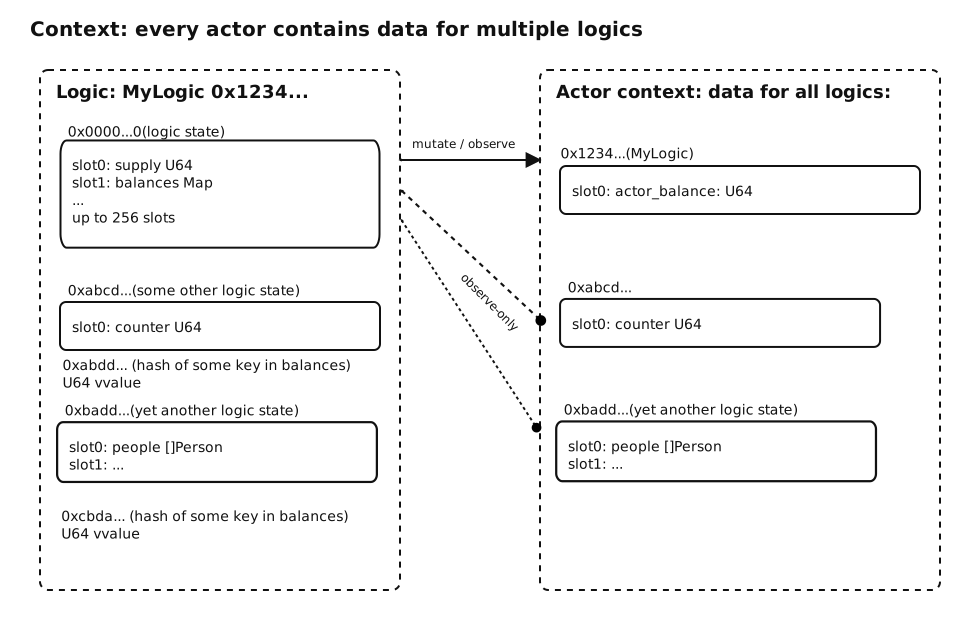
Use actor state for frequently accessed data to enable parallel execution. Reserve logic state for initialization and shared configuration.
Declaring State
coco MyLogic

state logic:
    name String
    total_supply U256

state actor:
    balance U256
    registered Bool
Accessing State
Use three-component identifiers:
| Pattern | Description |
|---|---|
Module.Logic.field | Logic state |
Module.Sender.field | Current sender's actor state |
Module.Actor(id).field | Specific actor's state |
// Logic state
observe supply <- MyLogic.Logic.total_supply

// Sender's actor state
observe bal <- MyLogic.Sender.balance

// Specific actor's state
observe other_bal <- MyLogic.Actor(user_id).balance
Observing State (Read)
Use observe to read from state:
// Simple read
observe name <- MyLogic.Logic.name

// Multiple values
observe name, supply <- MyLogic.Logic.name, MyLogic.Logic.total_supply

// With block (value available inside)
observe counter <- MyLogic.Sender.counter:
    if counter > 100:
        throw "Limit exceeded"
Mutating State (Write)
Use mutate to write to state:
// Direct assignment
mutate "TokenName" -> MyLogic.Logic.name
mutate 1000 -> MyLogic.Logic.total_supply

// With block (modify and save)
mutate counter <- MyLogic.Sender.counter:
    counter += 1

// Nested mutations
mutate supply <- MyLogic.Logic.supply:
    supply -= amount
    mutate bal <- MyLogic.Sender.balance:
        bal += amount
Writing Another Actor's State
On 0.8.0 targets the runtime checks every write to actor state and denies it unless the
actor being written has granted permission. Writes to Module.Sender.* and Module.Logic.* are
always allowed; reads are never gated.
endpoint dynamic Transfer(to Identifier, amount U256):
    mutate sender_bal <- Token.Sender.balance:      // always allowed
        sender_bal -= amount
    mutate to_bal <- Token.Actor(to).balance:       // denied unless `to` granted access
        to_bal += amount
error: actor is not allowed to write into other actor's storage
The grant is issued by the target actor (their wallet, or the
grant storage_mutate command in Cocolab), names the logic that
performs the write, and constrains who may call it. Two consequences shape how logic is written:
- The caller is not always the sender. On a cross-logic call the caller is the calling logic,
so the grant has to name that logic and be issued through the logic that actually performs the
mutate. On a direct call the caller is the signing user, and the grant leans on the origin instead. - Being a participant is not permission. Including an actor in an interaction lets the logic reach their context; the grant is what allows writing to it.
Designs that only ever write Module.Sender.* never need a grant. Where that is not possible —
token ledgers, airdrops, settlement — either collect the grant as part of onboarding, or invert the
flow: record the claim in logic state and let the recipient collect it with an endpoint that writes
only their own actor state.
Paying for Storage — payer
The payer clause requires version = "0.8.0" under [target.pisa] in coco.nut. On earlier
targets the compiler reports "payer for state logic volume is not supported ... requires 0.8.0".
Writing to logic state consumes storage volume, and somebody has to pay for it. By default the
sender of the interaction pays. The optional payer clause names a different account:
// Sender pays — the default when payer is omitted
mutate name -> Token.Logic.name

// The logic pays out of its own storage allowance
mutate name -> Token.Logic.name payer Logic

// A specific actor pays
mutate name -> Token.Logic.name payer Actor(sponsor)
On the block form, the clause goes after the state field and before the colon:
mutate supply <- Token.Logic.supply payer Logic:
    supply += amount
| Payer | Who pays for the storage |
|---|---|
Sender | The actor that initiated the interaction (default) |
Logic | The logic itself |
Actor(id) | The actor identified by id |
payerapplies to logic state only. Using it on actor state fails to compile with "payer can only be set on logic state" — actor state already lives in the actor's own context, so that actor pays for it.observehas nopayerclause. Reading state consumes no storage.
Measuring what a write costs
Environment.StorageResult() reports how many storage bytes the current interaction has added and
removed, for a given storage account and payer pair:
coco Token

state logic:
    name String

endpoint deploy Init(name String) -> (added, removed U64):
    mutate name -> Token.Logic.name payer Logic
    // storage of the Token logic, paid by the Token logic
    added, removed = Environment.StorageResult(Identifier(Token), Identifier(Token))

endpoint dynamic Clear() -> (added, removed U64):
    mutate "" -> Token.Logic.name         // payer Sender is the default
    // storage of the Token logic, paid by the sender
    added, removed = Environment.StorageResult(Identifier(Token), Sender)
See Environment & Invocation for details.
Complex Values
For efficiency, Coco uses atomic storage — complex objects (maps, arrays, classes) are scattered across storage slots.
gather and disperse
To transfer entire complex objects, use explicit keywords:
| Keyword | Direction | Usage |
|---|---|---|
gather | Storage → Memory | Reading complete objects |
disperse | Memory → Storage | Writing complete objects |
// Reading a complete map entry
observe operators <- MyLogic.Logic.Operators:
    gather op <- operators[0]  // Load entire Operator object

// Writing a complete object
mutate operators <- MyLogic.Logic.Operators:
    disperse operators[0] <- Operator{
        name: "Admin",
        permissions: make([]String, 0)
    }
gather and disperse can be expensive for large objects. Prefer accessing individual fields when possible.
storage variables
As gather and disperse are expensive, there's a way to avoid transferring complete objects if we only want to observe or mutate a single field. Instead of gathering into a memory variable and dispersing it after change, we can use storage variable that serves only as a pointer to an object inside atomic storage. Using it, we can perform much cheaper operations, like in this example:
coco StorageVarExample

class LargeData:
    field category String
    field data []Bytes // a huge dataset
    field exists Bool

state actor:
    store []LargeData

endpoint static FindCategoryExpensive(category String) -> (data LargeData):
    memory mem_data LargeData
    observe st <- StorageVarExample.Sender.store:
        memory last_index = len(st)
        for idx in range(last_index):
            memory slot LargeData
            gather slot <- st[idx]
            if slot.category == category:
                return (data: slot)
    // if it's not found, a zero-value of LargeData is returned

endpoint static FindCategoryEfficient(category String) -> (data LargeData):
    memory mem_data LargeData
    observe st <- StorageVarExample.Sender.store:
        memory last_index = len(st)
        for idx in range(last_index):
            storage slot_ptr LargeData
            slot_ptr = st[idx]
            if slot_ptr.category == category:
                memory slot LargeData
                gather slot <- st[idx]
                return (data: slot)
    // if it's not found, a zero-value of LargeData is returned
The example above shows how we can use storage variable - a pointer to a storage object - that allows us to read a simple boolean value without gathering a complete object from storage, and only gather the data when found. In the worst-case scenario, where we're searching for a category that doesn't exist, the FindCategoryExpensive transfers a complete store of all LargaData objects, just to realize the data doesn't exist. FindCategoryEfficient just checks the string field category of each element and doesn't unnecessarily transfer large data fields.
Cleaning up with sweep
When removing the last element from a collection in state, use sweep to remove the empty collection from storage:
mutate operators <- MyLogic.Logic.operators:
    sweep remove(operators, key)    // Remove map entry
    sweep(operators)                // Remove empty map from storage

mutate arr <- MyLogic.Logic.arr:
    memory removed = sweep popend(arr)  // Remove last and capture value
Complete Example
coco Token

state logic:
    name String
    supply U256

state actor:
    balance U256

endpoint deploy Init(name String, supply U256):
    mutate name -> Token.Logic.name
    mutate supply -> Token.Logic.supply

endpoint enlist Register():
    mutate 0 -> Token.Sender.balance

endpoint dynamic Transfer(to Identifier, amount U256):
    mutate bal <- Token.Sender.balance:
        if bal < amount:
            throw "Insufficient balance"
        bal -= amount
        mutate to_bal <- Token.Actor(to).balance:
            to_bal += amount

endpoint static GetBalance() -> (balance U256):
    observe balance <- Token.Sender.balance
Parallelism Note
Mutating logic state requires a lock, preventing parallel execution:
// Anti-pattern: blocks parallelism
endpoint dynamic Claim():
    mutate supply <- Logic.supply:  // Lock required
        supply -= 1
For high-throughput endpoints, use actor state or native assets.